- Ben Haresign
- 11 Jun, 2026
- Compliance
- 16 min read
AI in General Practice: It Is Not Just Patient Data You Need to Worry About
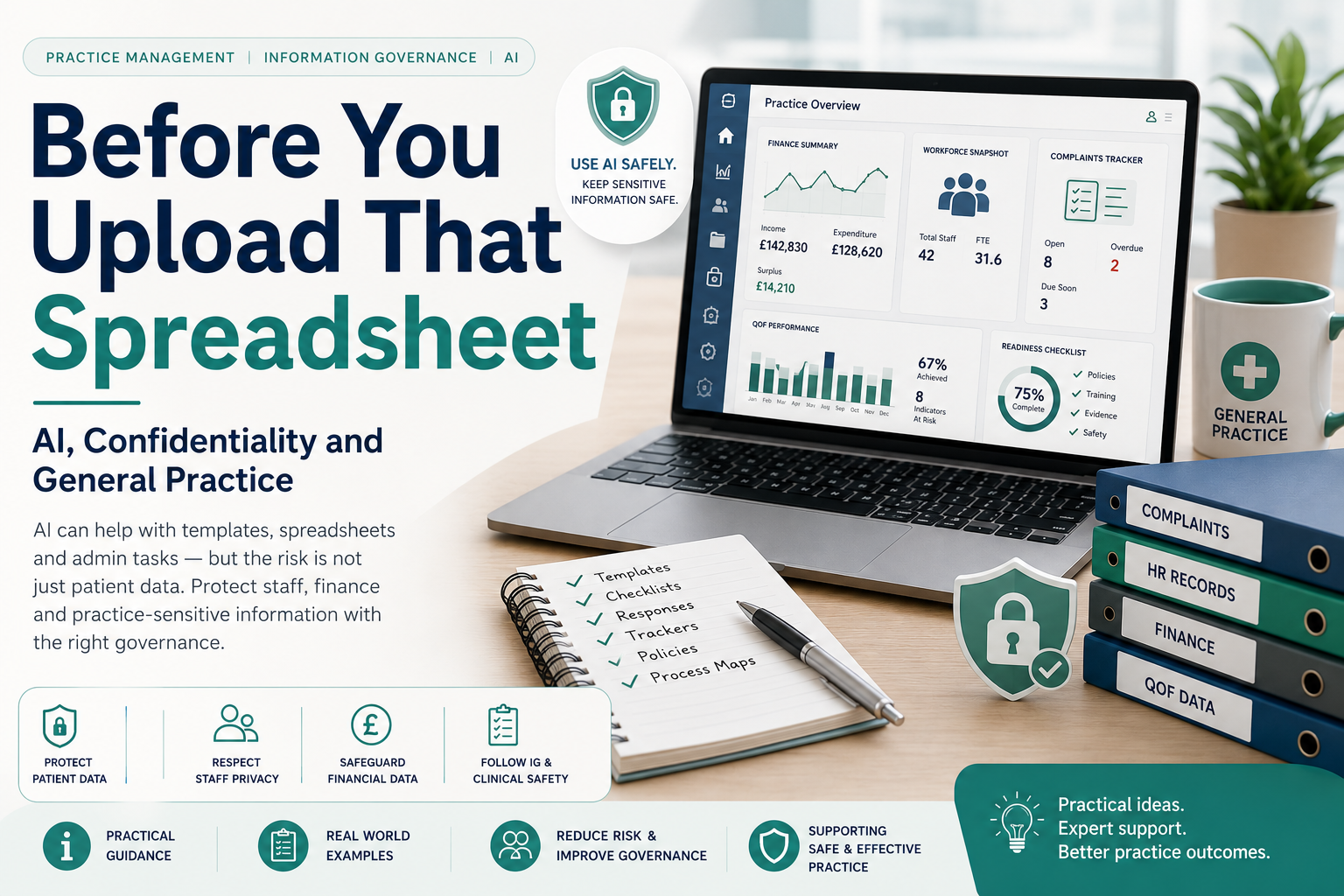
Before You Upload That Spreadsheet:
AI, Confidentiality and General Practice
AI can be incredibly useful in general practice. It can create templates, improve wording, structure trackers, draft policies and reduce repetitive admin. But the risk is not only patient identifiable data.
It is also staff data, finance data, complaints, workforce information, QOF exports, CQC evidence and commercially sensitive practice information.
Quick takeaway
The question is not simply whether AI can help. It can.
The better question is: what are we allowing AI to see?
It is not just patient data you need to worry about
There is a lot of excitement about using AI agents, Copilot-style tools and large language models to reduce administrative workload in general practice. That excitement is understandable. Practices are under pressure, inboxes are full, complaints need timely responses, spreadsheets need building and managers are constantly asked to produce more with less.
Used well, AI can be a helpful assistant. Used carelessly, it can become a new route for confidential information to leave the practice without anyone fully understanding where it has gone, how long it is stored, whether it is retained, or whether it can be reused.
The obvious concern is patient identifiable data. That matters enormously. But it is not the only concern. General practice also holds sensitive operational data: finance figures, payroll information, partner drawings, staff sickness, rota gaps, complaints, HR notes, risk registers, QOF performance and CQC evidence.
The risk is not always deliberate misuse. Sometimes it is simply misunderstanding the tool: what it does, what it stores, what it can invent, and what data it should never see.
Not all sensitive data is patient data. And not all AI risk starts with a medical record.
A quick note on how AI actually works
Part of the risk is that many people use AI tools without really understanding what they are interacting with. They may think of AI as a clever search engine, a smarter version of Word, or a private assistant that simply answers a question and forgets it.
That is not quite right.
A large language model does not “know” things in the same way a person does.
It generates likely words, sentences and responses based on patterns in data, the prompt it has been given, the context available to it, and the rules or settings around the tool being used.
That means AI can sound confident, polished and authoritative even when it is wrong, incomplete or making assumptions. This is why AI-generated content should always be reviewed before it is used in a practice document, complaint response, policy, spreadsheet, patient communication or management decision.
It predicts language
AI is very good at producing text that looks right. That does not mean the facts, judgement or conclusions are automatically right.
It may not understand context
A practice manager knows the local system, the people, the history and the nuance. AI only sees what it is given and may miss what matters.
It can invent details
AI can fill gaps with plausible-sounding content. In a complaint response, HR letter, finance report or clinical workflow, that can create obvious risk.
It depends on the tool
Different AI tools handle data differently. Some may retain prompts, some may use data for improvement, and some enterprise tools may have stronger protections. The detail matters.
Your prompt may not disappear when you close the window
One of the biggest misunderstandings about AI is the assumption that a prompt is like a private note: you type it, receive an answer, close the window and it is gone.
That may not be true. Depending on the tool, licence, settings and supplier terms, prompts and uploaded files may be stored, logged, reviewed, retained for a period of time, or used to improve the service. In some systems, information entered into the tool may also be available later as context, history or memory.
This does not mean every AI tool uses prompts to train future models. Some enterprise or approved systems may have stronger controls and may specifically prevent this. But the practice should not assume that by default.
It also does not usually mean that another user will see the original prompt word-for-word. The issue is more subtle: the practice may no longer have full control over how that information is processed, retained, reviewed or used to improve future model behaviour.
In plain English
If you would not want the information stored, audited, reviewed, reused or accidentally surfaced later, do not put it into an AI tool unless that tool has been approved for that type of data.
Questions practices should ask
- Are prompts and uploaded files stored?
- How long are they retained?
- Can supplier staff review them?
- Can they be used to improve or train the model?
- Can they appear later as memory, context or conversation history?
- Can another user in the organisation access them?
- Can the data be deleted?
- Is there an audit trail?
- Are the settings different for free, personal, business, enterprise or NHS-approved versions?
The golden principle
Build the template with AI. Fill it with sensitive data inside approved systems.
That one sentence solves a lot of the risk. AI can help design the spreadsheet, create the complaint tracker, suggest the investigation checklist or draft the policy structure. But the live data should remain in systems and processes that the practice has approved, governed and documented.
The complaints example: where the risk becomes obvious
Complaints are one of the most tempting areas for AI use. A practice receives a complaint, the manager is busy, the response deadline is approaching, and AI appears to offer a quick way to summarise the issue, draft an acknowledgement and produce a polished response.
The problem is that complaints often contain exactly the type of information that should not be casually copied into an unapproved AI tool.
Avoid prompts like:
“Here is the full complaint from the patient. Please summarise it and write a response.”
This may include patient identifiable data, clinical details, staff names, family information, safeguarding context, appointment dates, allegations and third-party details.
Use prompts like:
“Create a complaint response framework for a GP practice using placeholders for confirmed facts, impact, findings, apology where appropriate, learning and next steps.”
This lets AI help with the structure while keeping the actual complaint details inside your approved complaints process.
Good complaint prompts
Acknowledgement template
“Draft a polite complaint acknowledgement letter for a GP practice. Confirm receipt, explain the investigation process, give the expected response timeframe and include contact details. Do not include patient-specific information.”
Investigation checklist
“Create a checklist for investigating a GP practice complaint. Include acknowledgement, fact finding, staff statements, clinical review, response drafting, learning actions and closure.”
Tone improvement
“Rewrite this generic paragraph so it sounds more empathetic, professional and less defensive: ‘We are looking into your concerns and will respond when we have reviewed the matter.’”
Learning log
“Create a complaints learning log template for a GP practice. Include theme, issue, immediate action, learning, owner, due date, evidence and completion date.”
Why this matters
Patient confidentiality
Complaints, clinical summaries, QOF searches and appointment histories can all include identifiable or sensitive patient information. Even removing the name may not make the data anonymous if the situation, timeline or condition is specific enough to identify someone locally.
Staff confidentiality
Rotas, sickness records, HR cases, disciplinary notes, payroll reports and performance concerns can identify staff and may contain highly sensitive employment information.
Commercial sensitivity
Practice accounts, partner drawings, supplier costs, workforce plans, redundancy modelling and PCN funding allocations may not identify patients, but they can still cause serious harm if shared inappropriately.
Clinical safety
If AI is being used in a way that influences patient care, triage, diagnosis, recall, coding, prescribing, prioritisation or clinical decision-making, the issue moves beyond simple admin support. Clinical safety governance may then become relevant.
The spreadsheet trap
A common example is spreadsheet creation. Someone asks:
“Can you create a spreadsheet to analyse our practice finances?”
That sounds harmless. In many cases, it is harmless. Asking AI to create a blank budget template, a workforce planning structure or a QOF monitoring sheet can be very useful.
The risk starts when the next step is uploading the live spreadsheet:
- actual income and expenditure
- payroll costs
- named staff salaries
- partner drawings
- locum spend
- cashflow concerns
- supplier contracts
- PCN income
- redundancy or restructure modelling
- unpublished board or partner papers
Safe use versus risky use
| Task | Safer AI use | Risky AI use |
|---|---|---|
| Finance spreadsheet | Create a blank GP practice budget template with headings and formulas. | Upload actual accounts, partner drawings or payroll data for analysis. |
| Complaints | Create an acknowledgement template or response framework. | Paste the full complaint email with patient details and ask AI to respond. |
| QOF | Create a QOF monitoring template by indicator, register, denominator, numerator and action owner. | Upload identifiable disease register exports or patient recall lists. |
| Staff rota | Create a generic rota template using role types only. | Upload a named rota showing sickness, absence, performance issues or flexible working arrangements. |
| HR | Create a probation review template or investigation checklist. | Paste named staff concerns, disciplinary notes or occupational health information. |
| CQC readiness | Create a blank evidence tracker mapped to Safe, Effective, Caring, Responsive and Well-led. | Upload internal incident logs, complaints, safeguarding issues or named staff risks. |
| Access data | Create a dashboard structure for appointment demand, DNA rates and telephone trends. | Upload raw appointment data containing patient names, clinician names or identifiable patterns. |
| Policy writing | Draft a generic SOP structure for local review and approval. | Treat an AI-generated policy as approved governance without review, ownership or version control. |
Good examples: prompts that keep the risk low
Finance template
“Create a blank monthly finance monitoring spreadsheet for a GP practice. Include columns for income, expenditure, staffing costs, premises, PCN income, enhanced services, variance, comments and action owner. Use placeholder figures only.”
Complaints framework
“Create a formal complaint response structure for a GP practice. Include acknowledgement, investigation summary, findings, apology where appropriate, learning actions and escalation options. Do not include patient details.”
QOF tracker
“Create a QOF monitoring spreadsheet structure by indicator, register size, denominator, numerator, achievement, exception rate, income risk, action owner and review date. Do not use real patient data.”
CQC evidence tracker
“Create a CQC evidence tracker template for a GP practice mapped to Safe, Effective, Caring, Responsive and Well-led. Include evidence type, owner, review date, gap, action and completion status.”
Risky examples: prompts that should make you pause
Be cautious with prompts like these:
- “Here is our finance report. Tell me where we can cut costs.”
- “Here is our payroll spreadsheet. Find anomalies.”
- “Here are our complaints from the last year. Identify themes and draft responses.”
- “Here is our QOF export. Tell me which patients need chasing.”
- “Here is a staff sickness tracker. Summarise who is causing the most issues.”
- “Here are our partner accounts. Create a meeting presentation.”
- “Here is a safeguarding complaint. Draft the response.”
These may contain patient identifiable data, staff identifiable data, confidential business information or information that could cause reputational, legal, financial or operational harm if handled incorrectly.
The extra risk with AI agents
A one-off prompt is one thing. An AI agent is different. An agent may be connected to email, documents, folders, calendars, spreadsheets or workflows. It may have memory. It may take actions. It may summarise previous cases. It may retrieve information from places the user has forgotten it can access.
That does not mean agents should never be used. It means they need boundaries.
Before creating an AI agent, ask:
- What systems can it access?
- Can it read emails?
- Can it access shared drives?
- Can it access patient information?
- Can it access staff information?
- Can it access finance folders?
- Does it retain information?
- Does it learn from previous outputs?
- Who can query it?
- Can it send messages?
- Is there an audit trail?
- Who approves its use?
Where DCB0129 and DCB0160 may come in
Not every use of AI in a practice will automatically fall into digital clinical safety standards. Asking AI to create a blank spreadsheet template or improve the wording of a generic policy is very different from deploying a tool that influences patient care.
However, if AI is being used in a way that could affect clinical decisions, patient prioritisation, triage, coding, recall, diagnosis, medicines, safety-netting or direct care, practices should pause and consider whether clinical safety governance is required.
DCB0129
This is mainly aimed at manufacturers of health IT systems. It is about evidencing clinical risk management during the manufacture and development of health IT software.
DCB0160
This applies to health organisations deploying and using health IT systems. It requires organisations to manage the clinical risks associated with implementation and use.
Examples where DCB thinking may become relevant
- AI that prioritises patient requests or online consultations
- AI that suggests urgency or triage outcomes
- AI that drafts clinical advice or safety-netting text
- AI that searches records and recommends recalls
- AI that summarises consultations into the clinical record
- AI that codes diagnoses, symptoms or medication issues
- AI that identifies patients for review or exclusion
These are no longer simple admin productivity tasks. They touch the clinical workflow and may require proper clinical safety assessment, supplier assurance, local deployment governance and ongoing monitoring.
A practical AI governance checklist for practices
Before entering data into AI, uploading a file, connecting an agent or using an AI-generated output, ask:
- Does this include patient identifiable data?
- Does this include staff identifiable data?
- Does this include confidential finance, contract or partner information?
- Could someone be identified even if names are removed?
- Could this prompt or upload be stored, retained, reviewed or reused?
- Is the tool approved for this type of data?
- Do we know where the data is processed and stored?
- Do we know whether the data is retained?
- Can the data be used for model training or future improvement?
- Is there a DPIA or local IG approval where needed?
- Is there a supplier contract or data processing agreement where required?
- Is there an audit trail?
- Does the output need human review before use?
- Could the output affect patient care or clinical risk?
- Do DCB0129, DCB0160 or local clinical safety processes need to be considered?
- Would we be comfortable explaining this use to a patient, staff member, partner, commissioner or regulator?
Do and don’t guide
- Use AI to create blank templates.
- Use AI to improve generic wording.
- Use AI to structure policies, SOPs and checklists.
- Use anonymised themes rather than raw complaints.
- Use dummy data where examples are needed.
- Keep sensitive data inside approved systems.
- Review and approve AI outputs before use.
- Keep version control and human ownership.
- Check IG requirements before uploading files.
- Check clinical safety requirements if patient care could be affected.
- Check whether prompts or uploads may be stored, retained, reviewed or reused.
- Paste full patient complaints into unapproved AI tools.
- Upload live QOF or clinical search exports containing patient data.
- Upload payroll or HR files containing named staff information.
- Upload partner accounts or confidential finance papers casually.
- Assume removing names means the data is anonymous.
- Assume your prompt disappears when you close the window.
- Allow AI to invent facts for complaint responses.
- Use AI as the official investigation record.
- Deploy an agent without defining what it can access.
- Let AI send external responses without human review.
- Use AI in clinical workflows without considering clinical safety governance.
A better way to ask AI
Avoid:
“Here are our accounts. Tell me where we are overspending.”
Better:
“Create a GP practice finance review framework. Include income, staffing, premises, prescribing-related costs, enhanced services, PCN income, variance analysis and suggested questions for the management team.”
Avoid:
“Here is the full complaint. Write the response.”
Better:
“Create a complaint response framework for a GP practice using placeholders for confirmed facts, impact, findings, apology, learning and next steps.”
Avoid:
“Here is our patient list. Tell me who to chase.”
Better:
“Create a QOF recall planning template for a GP practice. Include indicator, cohort, action needed, responsible role, recall method, deadline, exception considerations and status.”
Avoid:
“Here are the notes from a named staff performance issue. Draft the outcome letter.”
Better:
“Create a generic structure for a supportive performance improvement plan, including expectations, support offered, review dates, documentation and escalation points.”
A simple practice policy position
Practices do not need to ban AI to use it safely. But they do need a clear position.
Suggested wording:
Staff may use approved AI tools to support generic drafting, template creation, process mapping and administrative structure. Staff must not enter patient identifiable data, staff identifiable data, confidential financial information or commercially sensitive practice information into AI tools unless the tool has been approved for that purpose and the appropriate information governance, contractual and clinical safety requirements have been met. Staff should also consider whether prompts, uploaded files or outputs may be stored, retained, reviewed, reused or used to improve the service before entering any sensitive information.
That position is balanced. It allows innovation while drawing a clear line around data, governance and accountability.
Final thought
AI will become part of general practice. That is almost inevitable. The opportunity is real: better templates, faster drafting, improved structure, reduced duplication and more consistent administration.
But the risk is also real. Patient data is the obvious concern, but it is not the only one. Practice finance data, payroll, HR records, complaints, QOF exports, CQC evidence and partner papers all need care.
The safest practices will not be the ones that ignore AI. They will be the ones that use it deliberately.
Let AI help with the structure. Keep sensitive data inside governed systems. And before uploading anything, ask: what am I allowing AI to see?